There are very compelling reasons to use a full-text search based on an inverted index and a relevancy scoring model. In my experience, the best reason is when you're actually trying to perform a Search function and expect the first result to be the most relevant. That is exactly why search engines were built, and I'll assume that's your main use case.
Secondly, the inverted index may be superior to classic database indexes in some cases, but remember that it's not its primary purpose.
For the remainder of this article, we'll use "search" and "query" this way:
- "Search" means to retrieve and return information ranked by relevancy (the most important concept here). The first document returned is the most relevant, and subsequent search results are less and less relevant according to the relevancy algorithm/score.
- "Query" focuses on finding information but does not imply that relevancy is important, and is more akin to a regular database query that returns information matching certain criteria.
Oftentimes, using search engines requires setting up, maintaining, and securing a dedicated search system. Subsequently, you had to learn a new API and the quirks that come with every system. It can be so involved that some people would rather have a poor search experience than deal with the hassle.
Introduction: The New Era of MongoDB Search
Removing this friction is the motivation behind MongoDB Search and Vector Search being built into the same software and accessible by one connection URL and API. Today, this powerful search functionality is available in the free MongoDB Community edition (run it locally!) and, of course, on Atlas, the cloud MongoDB platform.
Laravel users are top of mind, and this article will demonstrate how to utilize Full Text Search (FTS) with an existing MongoDB database.
Laravel implementation
在本文中,我们将使用 GitHub 代码库 to illustrate how MongoDB Search works in Laravel. I created a tag , as the repo will evolve in the future.
该仓库的 README.md 文件包含更多信息,其结构与教程的自然进度相呼应:每个部分都包含配置选择背后的“原因”、带有预期输出的示例命令,以及解释哪里出了问题以及如何解决的故障排除指南。
运行该仓库的前提条件
- 一个运转正常的
PHP/Laravel 开发环境
。
- We recommend using our pre-built, zero-setup, environment on GitHub Codespaces (个人账户免费)
- 开始
free MongoDB Atlas cloud cluster
已加载 mflix_sample 数据库
- 这是
如何启动一个免费集群
和
load the sample databases
。
- If you really want to run MongoDB locally, here are some instructions , but that is not CodeSpaces-friendly.
- 这是
如何启动一个免费集群
和
load the sample databases
。
将 Laravel 应用连接到 MongoDB 数据库
如果您之前没有从 Laravel 连接过 MongoDB,我们有一篇更详细的教程。 如何使用 Laravel 和 MongoDB 构建后端服务 . In this article, we'll emphasize only the main points related to using MongoDB Search in Laravel.
We'll assume that your MongoDB Atlas cluster is now running and that you have loaded the sample data, especially the 示例_mflix database, which we will be using. Alternatively, there's MongoDB 指南针 一款原生应用,提供更灵敏、更友好的用户体验。
这 示例_mflix database contains two movie collections, "movies" and "embedded_movies." We are going to work on the "movies" collection, as it does not contain vector embeddings. Our Laravel app will create the embeddings.
连接到数据库
首先,让我们使用代码库连接到 MongoDB 数据库。
集群网络访问 : Make sure your current IP address is allowed through the cluster's firewall by adding it to the allowed list. If you are working on public WiFi (hotel, convention center, airport, etc.), adding the IP won't be enough, and you may need to allow all IPs to have access, which is not recommended for security. Follow the instructions on the official documentation page (jump to " 添加 IP 访问列表条目 然后选择“Atlas GUI”选项卡)。
从 Laravel 连接 :基于 .env.example 文件创建一个 .env 文件,并查找 DB_CONNECTION=mongodb 紧接着下面,你需要更新…… 数据库 DSN entry with the actual connection string of your live cluster that includes username and password. Here's a tutorial that shows how to get the connection string in Atlas (jump to " In Atlas, go to the Clusters page for your project ").
Our CodeSpaces environment will run the three commands below at startup (look at init_repo.sh in the repo). If you prefer your own setup, don't forget to initialize the repo with the commands below:
#create a new .env filecp

.env.示例

.env# 下载我们应用所需的库作曲家

安装#generate the keys for this appphp

工匠

密钥:生成
In the .env file, replace the sample DB_DSN MongoDB connection string with your own.
DB_CONNECTION=mongodbDB_DSN=mongodb+srv://USERNAME:PASSWORD@cluster.mongodb.net/sample_mflix?retryWrites=true&w=majorityDB_DATABASE=sample_mflixDepending on your Laravel environment, you may have different base URLs, for example:
| 环境 | Example URL |
|---|---|
| Local PHP | http://localhost:8000/api/hello |
| 代码空间 | https://[unique-id]-8000.app.github.dev/api/hello |
| Docker | http://127.0.0.1:8080/api/hello |
In the article, we'll simply use
{{BASE_URL}}/api/hello在 Codespaces 环境中,您可以通过将鼠标悬停在“端口”选项卡中的“地球”图标上来找到 URL。
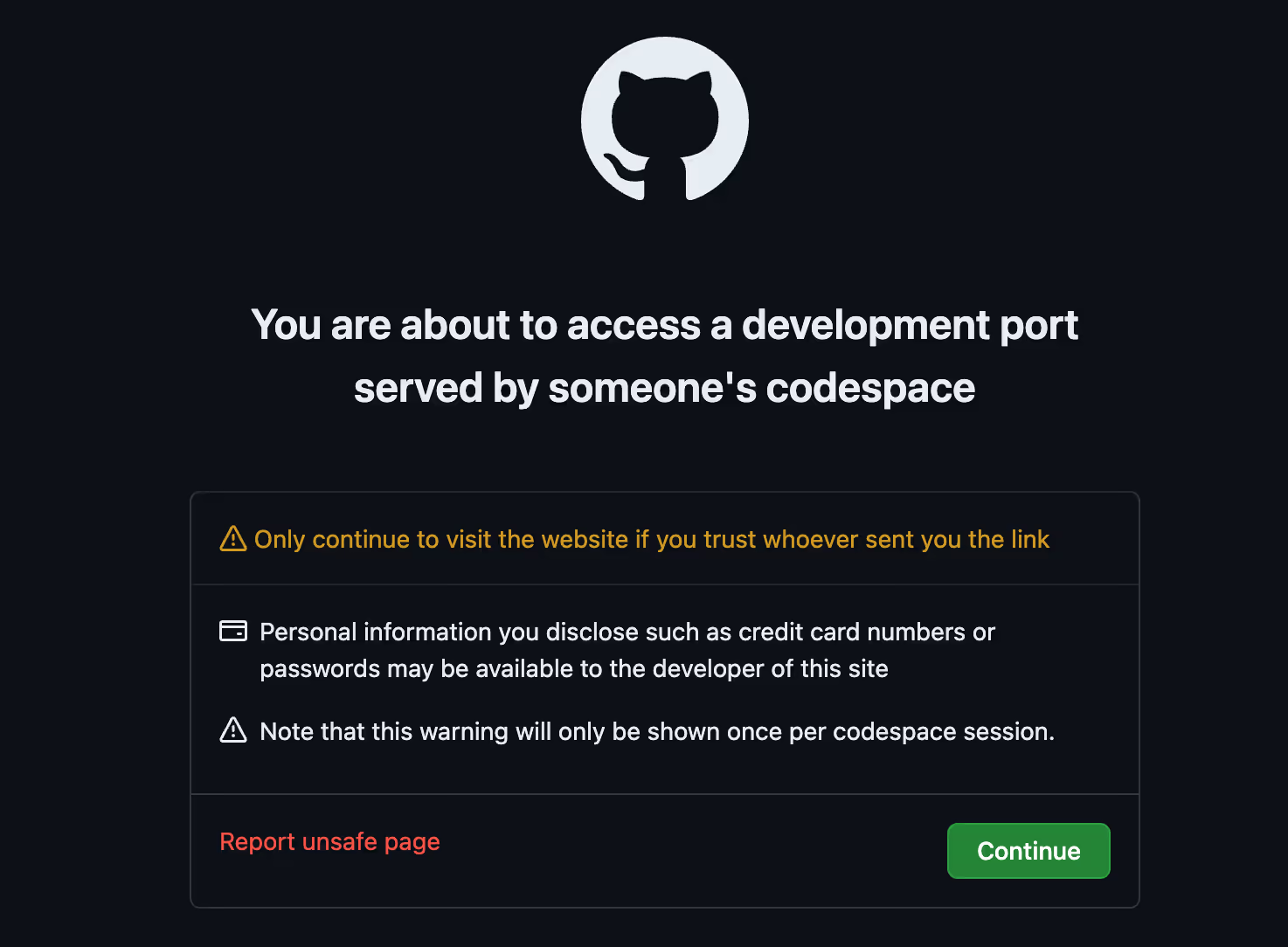
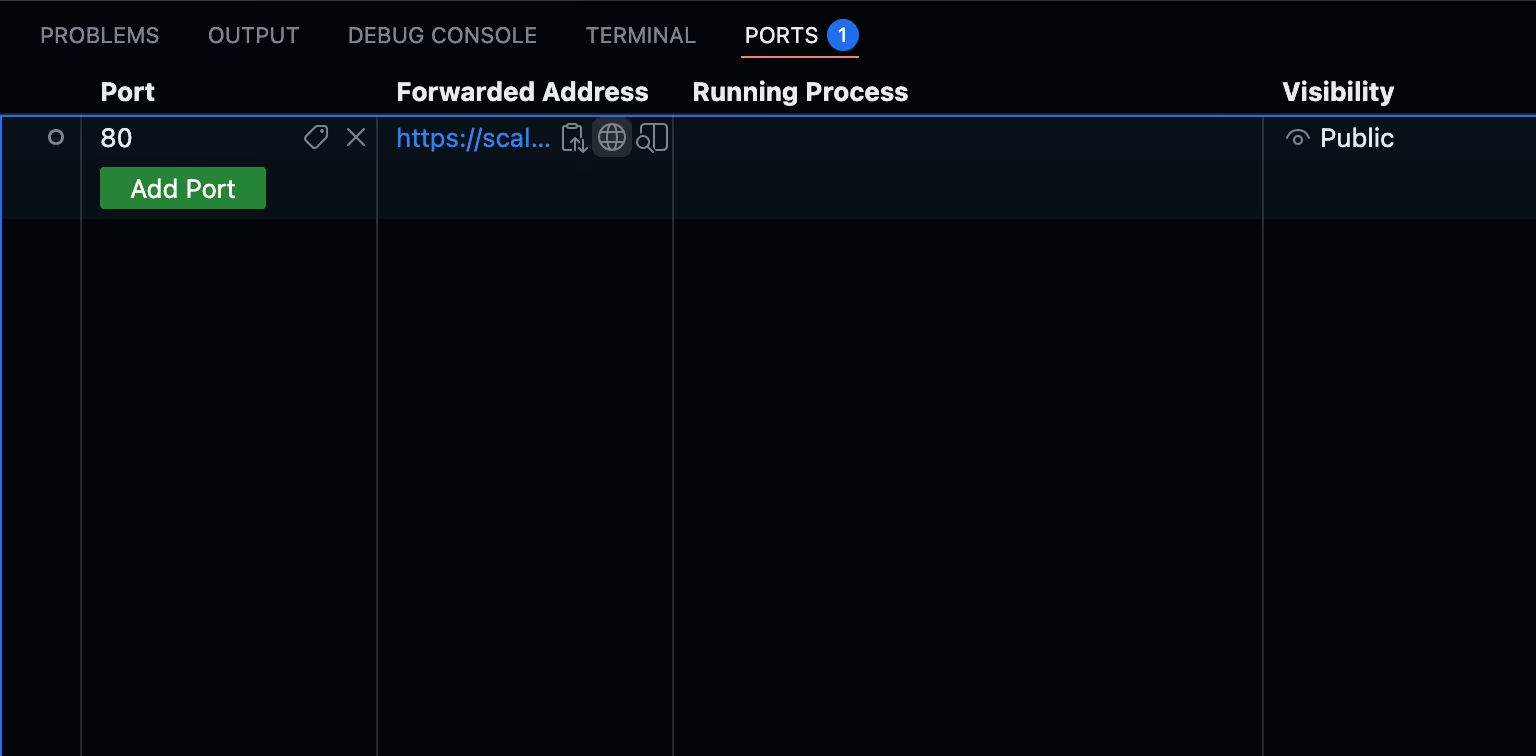 We're going to build some API endpoints, so in CodeSpaces, port 80 is made "public" to facilitate access. If you see a warning message like this, just click on Continue.
Note that MongoDB's schema flexibility allows us to remain migration-free for now, so we won't have to execute "php artisan migrate". Once your credentials are in, run this command to launch the app:
php

工匠

服务
There are some API endpoints that have been created for testing the app and the connection to MongoDB.
Remember, in Codespaces, the URL format is {friendly-name}-{random-hash}-{port}.app.github.dev and can be obtained in the Ports tab.
如果应用程序正在运行,则返回 {"response":"hello world"}卷曲
{{
BASE_URL
}}/api/hello# 返回 {"status":"success","connection":"MongoDB 连接成功"...卷曲
{{
BASE_URL
}}/api/mongodb-test
If both API calls are successful, our connection is solid, and we are ready for the next step: start our Relevancy-based Search journey!
MongoDB Full-Text Search Options: $text Index vs. MongoDB Search (Lucene-powered)
Why LIKE Queries and Regex Fail: Moving Beyond Basic Pattern Matching
Let's provide some context. When developers want to search records based on text, it is not uncommon to start with an exact match on a text field, with inherent usability limitations.
Subsequently, a regex matching is introduced to return data based on certain string patterns. However, regex often involves a full (B-tree) index scan , and although better than a full documents scan, it is not very scalable, and the latency will decrease the user experience as the dataset grows.
Using a MongoDB text index can be a bit better for natural language queries and features tokenization, removes stop words (the, a, and…), and has stemming (the word "running" becomes the "run" token) but you won't be able to use regex on this kind of index as the original strings is processed into tokens.
The results can be ordered in various ways. For example, to use these techniques on a blog, you may sort the results and have the most recent articles appear at the top. The search process seemingly works, but the most recent article may not be the most relevant article for that search phrase.
MongoDB Search Powered by Lucene: Enterprise Search in Your Database
MongoDB Search is a powerful, built-in search capability based on Lucene , an open-source search engine upon which big-name search engines are based. This feature started in the Atlas cloud, but is now also available in MongoDB Community edition since Sep 17 2025 。
MongoDB exposes the Lucene functionality as an aggregation pipeline, which looks and feels just like other MongoDB database queries and is accessed with the same database connection. No additional DevOps work. In this article, we'll explore how to use MongoDB Search using the native Laravel API.
Why Your Current Search Is Probably Sub-Optimal
Before diving into the code, it's good to know some fundamental principles of using MongoDB search and the underlying Lucene architecture. Using an ordinary MongoDB database index (B-Tree) to search for text is more likely to be slower. In some instances, you can scan a limited range of the index, but many use cases bump into situations where a full index scan or collection scan will happen. At scale, this is challenging. Going from an exact match to a regex makes it more costly.
The legacy text database index ($text) is better as it introduces some elements important to search.
- 代币 : strings are processed, insignificant words are removed, and word indexing is optimized by transforming original text words into "tokens". A Token is a word/string that is used for indexing.
- Relevancy : the legacy text index has a basic relevancy algorithm based on Term Frequency (TF)
MongoDB Search (powered by Lucene) takes search to the next level and features:
- Fuzzy matching using
Levenshtein Distance
logic.
- It can automatically find "Smartphone" even if the user makes a typo
- Specific spoken and written language support
- Much better scoring mechanism with the BM25 algorithm
- 自动完成 to suggest relevant results in real time, and the great Relevant As-You-Type Suggestions 教程 。
There are more advantages (multiple clauses, phrase search, relevancy tuning controls, analysis configuration, etc., and index intersection!), but for now, I think these are the primary things to focus on before learning more later. This will vastly improve the relevancy of your search functionality by making results more relevant.
Creating a Lucene-like Full-Text Search Index in MongoDB
Now let's code! Assuming the Laravel app is running, and you've been able to test that your MongoDB Atlas database is connected, you only need to take two additional steps before launching your first high-end search query! First, we'll create a search Index, the inverted index we talked about before. Secondly, we'll use the MongoDB Aggregation Pipeline to run the search query.
Search Index Creation
The search index is created in the CreateFullTextSearchIndex command. The main code is
$indexName
=

配置
(
'fulltext.index.name'
(英文):$collectionName
=

配置
(
'vector.collection'
(英文):// Get full-text search configuration$searchFields
=
[
'标题'
,
'阴谋'
,
'fullplot'
,
'投掷'
,
'directors'
];// Build field mappings for full-text search$fieldMappings
=
[];foreach
($searchFields
作为
$field) {$fieldMappings[$field]
=
[
'类型'

=>

'细绳'
];}// Create full-text search index$this
->
信息
(
'Creating new full-text search index...'
(英文):$结果
=
$集合
->
创建搜索索引
([
'mappings'

=>
[
'dynamic'

=>

错误的
,
'字段'

=>
$fieldMappings]],[
'姓名'

=>
$indexName]);
We call
createSearchIndex
with dynamic=false because we want to be intentional in the selection of attributes to be indexed. We know our data, and at the moment, the five attributes in
$searchFields
are the ones we think we'll need.
To trigger the creation of the index, execute the command:
php

工匠

fulltext:create-index# Force recreate (deletes existing index first)# php artisan fulltext:create-index --forceImplementing MongoDB $search in Laravel Eloquent: PHP Code Examples
Great, we know our search index is ready ( check in the GUI if you want ) and working inside MongoDB, but let's access that functionality via the Laravel framework.
We've implemented a "naive" search query in MovieSearchTextController:naive() to show you the mechanics and basic syntax, and what comes out with zero tuning. The main query is
$结果
=

电影
::
询问
()
->
总计的
()
->
搜索
(
操作员
:
搜索
::
文本
(
小路
:
配置
(
'fulltext.index.fields'
,[
'标题'
,
'阴谋'
,
'fullplot'
,
'投掷'
,
'directors'
]),
询问
: $query),
指数
:
配置
(
'fulltext.index.name'
))
->
addFields
(
分数
:[
'$meta'

=>

'searchScore'
])
->
限制
(
配置
(
'fulltext.search.limit'
))
->
得到
();
To have more insights, asked the search engine to give us its internal score computation by using $meta. This is important because we want to gauge how relevant the results are.
卷曲

-X

邮政
{{
BASE_URL
}}/api/search-text-naive \
-H

“内容类型:application/json”

\
-d

'{"query":"your search term here"}'
Sample output
{
“询问”
:

"The Godfather",
“结果”
:
[{
“_ID”
:{
“
$oid
“
:
"573a13b0f29313caabd341d2"},
“标题”
:
"C(r)ook"
,
“阴谋”
:
"A killer for the Russian Mafia in Vienna wants to retire and write a book about his passion - cooking. The mafia godfather suspects treason."
,
"fullplot"
:
"A killer for the Russian Mafia in Vienna wants to retire and write a book about his passion - cooking. The mafia godfather suspects treason."
,
"genres"
:[
"Comedy"],
“年”
:
2004
,
"cast"
:[
"Henry Hèbchen"
,
"Moritz Bleibtreu"
,
"Corinna Harfouch"
,
"Nadeshda Brennicke"],
"directors"
:[
"Pepe Danquart"],
"poster"
:
"https://m.media-amazon.com/images/M/MV5BNDY2MjlkMjYtNjJkYi00Yjc0LWI2MTItOTEwOWU4YzNkYjEwL2ltYWdlL2ltYWdlXkEyXkFqcGdeQXVyMzA3Njg4MzY@._V1_SY1000_SX677_AL_.jpg"
,
“分数”
:
8.478110313415527}{
<
movie-
2
>
},...{
<
movie-
10
>
},]
,
“数数”
:

10,
"search_type"
:

"naive",
"index"
:

"movies_fulltext_index"}
Suggested search terms for testing: "Titanic", "space adventure aliens", "Tom Hanks drama."
We sent a search query and let the BM25 algorithm use its default settings to return somewhat relevant results.
To unlock the full power of search, you, the developer, need to spice things up. The art of search is to take action to increase the relevancy using your intimate knowledge of both the data and how users want to search it.
MongoDB Search Field Weighting: Boosting Title, Cast, and Plot Fields
From my experience, Movie searches fall into three main patterns: title-first searches (60-70%), where users know exactly what they want; discovery/conceptual searches (20-30%), where users describe themes, plots, or moods; and actor/director searches (10-15%), where users look for content by talent. For text-based search systems, this suggests the title should receive the highest weight, followed by curated plot summaries for conceptual matching, with full descriptions serving as supplementary context.
Based on the above and given our dataset, we can start assigning different weights to different fields. We'll go with this set of weights:
- Title exact phrase match (10x) - Highest priority for exact title matches
- Title match (7x) - partial match
- Cast (5x) - Medium priority for actor-based searches
- Plot (3x) - Medium-high priority for curated summaries that capture movie essence
- Directors (2x) - Medium priority for director-based searches
- Fullplot (1x) - Standard weight for comprehensive descriptions
The query is implemented in MovieSearchTextController::weighted(), and the interesting part is
$结果
=

电影
::
询问
()
->
总计的
()
->
搜索
(
操作员
:
搜索
::
compound
(
应该
:[
// Exact phrase match on title - highest priority
搜索
::
phrase
(
小路
:
'标题'
,
询问
: $query,
分数
:[
'boost'

=>
[
'价值'

=>

10
]]),
// Fuzzy text match on title - high priority
搜索
::
文本
(
小路
:
'标题'
,
询问
: $query,
分数
:[
'boost'

=>
[
'价值'

=>

7
]]),
搜索
::
文本
(
小路
:
'投掷'
,
询问
: $query,
分数
:[
'boost'

=>
[
'价值'

=>

5
]]),
搜索
::
文本
(
小路
:
'阴谋'
,
询问
: $query,
分数
:[
'boost'

=>
[
'价值'

=>

3
]]),
搜索
::
文本
(
小路
:
'directors'
,
询问
: $query,
分数
:[
'boost'

=>
[
'价值'

=>

2
]]),
搜索
::
文本
(
小路
:
'fullplot'
,
询问
: $query,
分数
:[
'boost'

=>
[
'价值'

=>

1
]]),]),
指数
:
配置
(
'fulltext.index.name'
))
->
addFields
(
分数
:[
'$meta'

=>

'searchScore'
])
->
限制
(
配置
(
'fulltext.search.limit'
))
->
得到
();
You can see how each attribute gets a boost factor and how the syntax works. You can refer to the MongoDB Search documentation to learn more about the MongoDB Query Language for search.
You can use the weighted ("non-naive") search with this endpoint:
卷曲

-X

邮政
{{
BASE_URL
}}/api/search-text \
-H

“内容类型:application/json”

\
-d

'{"query":"your search term here"}'Naive vs Weighted Results
Since both search methods use a different relevancy Weighted Scoring Profile, we should not compare the scores between naive and weighted. Instead, the relative scores within each set of results are what's important.
Query: "The Godfather" (title-first use case)
| Naive Search | Weighted Search | ||||
|---|---|---|---|---|---|
| Rank | 标题 | Score | Rank | 标题 | Score |
| 1 | C(r)ook | 8.48 | 1 | The Godfather (1972) | 76.45 |
| 2 | Eadweard | 7.94 | 2 | The Godfather: Part III | 61.04 |
| 3 | Maqbool | 7.51 | 3 | The Godfather: Part II | 57.67 |
| 4 | The Godfather: Part III | 7.38 | 4 | Godfather | 26.28 |
| 5 | The Kennedys | 7.13 | 5 | The Kennedys | 17.17 |
Alternatively, search "The Matrix."
这 Naive Search fails due to "Keyword Dilution" and "Length Normalization" biases; BM25 rewards shorter documents like C(r)ook because the term "Godfather" makes up a larger percentage of their metadata compared to the dense, text-heavy records of the actual trilogy. Furthermore, without field weights, a single mention of "Godfather" in an obscure plot summary (such as Maqbool ) is treated as equal to a match in the title.
In contrast, the Weighted Search corrects this by applying a massive 10x boost to title exact-match (my thesis), ensuring that the exact sequence "The Godfather" anchors the top result. The strategy successfully groups the entire trilogy at the summit, creating a clear "relevance gap" where the intended masterpiece scores roughly 3.4x higher (86.56 vs 25.67) than the nearest irrelevant noise.
Query: "Tom Hanks"
| Naive Search | Weighted Search | ||||
|---|---|---|---|---|---|
| Rank | 标题 | Score | Rank | 标题 | Score |
| 1 | Shooting War | 19.21 | 1 | Shooting War | 50.44 |
| 2 | Larry Crowne | 14.53 | 2 | Larry Crowne | 39.86 |
| 3 | Tom and Huck | 10.25 | 3 | Nothing in Common | 36.48 |
| 4 | Tom and Huck | 10.25 | 4 | Tom Sawyer | 36.07 |
| 5 | Jerry and Tom | 10.00 | 5 | Tom Sawyer | 35.78 |
Shooting War : Tom Hanks is the narrator and executive producer. Because he appears in multiple weighted fields (Cast, Director/Producer, and Plot), his name creates a "cumulative score" that pushed it to the top.
Larry Crowne & Nothing in Common : Tom Hanks is the lead actor. The search successfully surfaced because the 4x Cast boost prioritized his name in the actor metadata over incidental mentions elsewhere.
Tom and Huck , Tom Sawyer , & Jerry and Tom : These are "false positives" triggered by the 5x Title boost. Since the engine was looking for "Tom" OR "Hanks," it found the name "Tom" in the titles and mistakenly assumed they were highly relevant, even though the "Hanks" part was missing.
While the common first name "Tom" still allows some noise, such as Tom Sawyer, to linger, the 10:5:4:3:2:1 weighting strategy effectively prioritizes structured entity data over unstructured plot descriptions. Ultimately, this transition from statistical keyword matching to hierarchical field importance proves that the system now understands user intent far better than standard BM25. There's 总是 room for improvement.
Conclusion: We Just Scratched the Surface
By now, you’ve experienced the "art" of search relevancy and seen how layering weights transforms raw data into an intuitive user experience. Together, we have built a search system that far outpaces standard database read queries by moving beyond simple string and pattern matching and into the realm of intent-driven ranking.
If MongoDB is already your application database, congratulations—you just unlocked enterprise-grade Lucene search with zero infrastructure changes, no ETL pipelines, and a single command (`php artisan fulltext:create-index`).
Even if you're running another database as your primary, MongoDB could serve as a scalable, best-of-breed search extension that handles full-text, vector, and geospatial queries on a single managed platform.
While we’ve made strides, there is always more to learn ; every dataset is unique, and the path to a "perfect" search result involves a constant, customizable cycle of testing, tuning, and iteration. My advice is that you come up with an evaluation mechanism, potentially multi-layered, that would indicate if the results are helping your business objectives.
This article is part of a series, and previously, we showed how to use MongoDB Vector Search with Laravel via Eloquent to perform semantic searches that go well beyond keywords.