Build Custom Middleware for Query Performance Monitoring and Optimization in Laravel with MongoDB
最后更新于 经过 摩西·阿努马杜

Performance issues can be one of the most challenging to solve in real-world applications because they are not bugs. Performance issues often hide in database queries, leading to situations where the application works but just does not perform great.
Often, when a route is slow, the real issues are usually inefficient queries, a missing index, or an unexpectedly expensive aggregation. Problems like this are usually difficult to identify without proper monitoring.
In this tutorial, we will build a lightweight monitoring system for Laravel and MongoDB applications. The goal is to track database query performance and request duration so we can quickly detect slow operations and point developers to them.
拉维尔 and MongoDB are a powerful pairing because they combine a highly productive PHP framework with a database built for scale and flexibility. Using the official Laravel MongoDB package, you can use Laravel's expressive Eloquent ORM to manage data without the rigid constraints of a traditional SQL schema.
By the end of this guide, you will have a working system that:
- Tracks MongoDB query execution time
- Identifies slow queries automatically
- Logs performance data for later analysis
- Automatically cleans up old logs using TTL indexes
Pre-requisites
The following prerequisites are required to follow along with the tutorial:
- Development environment setup for Laravel and MongoDB
- Working knowledge of the Laravel framework
- MongoDB Atlas account
Understanding the Architecture
Let's take a moment to explore the flow of what we will build. The monitoring system would consist of two components: Request Middleware 和 MongoDB Command Subscriber 。
Request Middleware
This is a custom Laravel middleware that we will create. It will accept requests from the client, measure the total duration of the HTTP request, and return insight into the time it takes from start to finish.
MongoDB Command Subscriber
We will create a PHP class that subscribes to the MongoDB PHP driver. The MongoDB PHP driver exposes a monitoring system that emits events whenever database commands are executed.
By subscribing to these events, we can capture query information, including the operation type (
find
,
insert
,
aggregate
), collection name, and execution time.
The image below shows the complete flow of the application from request to logging response in the MongoDB collection.
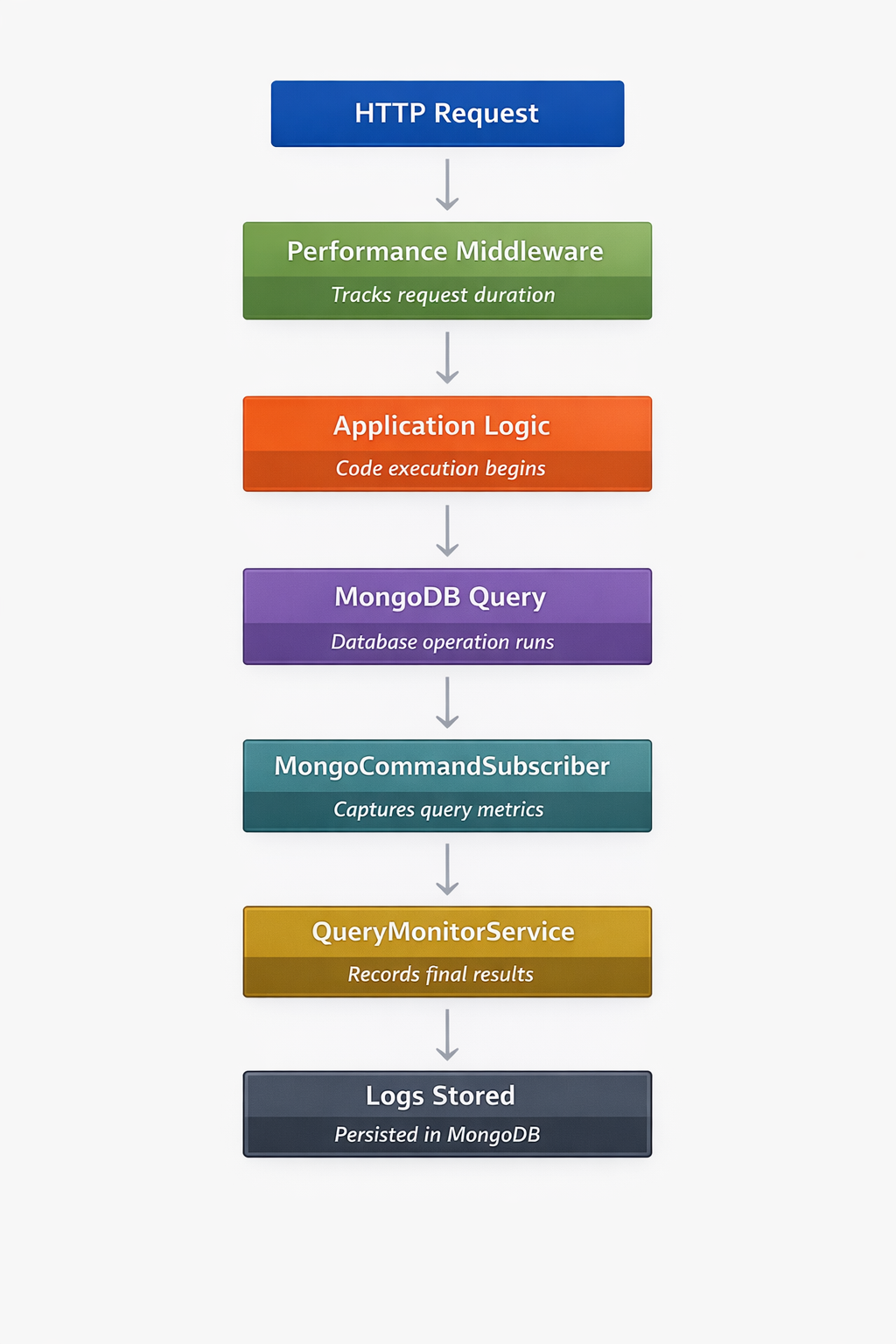 Now we have a clear picture of what we want to build. Let's get started building it.
项目设置
We will start by creating a fresh Laravel project using the command below:
作曲家

创造

项目

laravel/laravel

devrel-tutorial-customMiddlewareForQueryPerformance
We need to configure the freshly created Laravel project to work with MongoDB. Ensure you have the MongoDB PHP Extension installed and added to your
php.ini
file. Follow the instructions in the
MongoDB PHP driver installation guide
if you need help with the installation.
Next, we need to install the Laravel MongoDB package to configure Laravel to work with MongoDB. In the project directory, run the composer command below to install it.
作曲家

要求

mongodb/laravel-mongodbConfigure your .env File
We need to add your MongoDB Atlas connection details to the
.env
file. Log in to your MongoDB Atlas account and replace the
MONGODB_URL
below with your connection string.
MONGODB_URI
=
"mongodb+srv://USERNAME:PASSWORD@cluster0.xxxxx.mongodb.net/?retryWrites=true&w=majority&appName=devrel-tutorial-customMiddlewareForQueryPerformance-laravelnews"MONGODB_DATABASE
=
devrel-mongodb-driversConfigure config/database.php
We also need to add the MongoDB configuration to the details in
config/database.php
. Open the file and add the code below to the
connections
大批:
'mongodb'

=>
[
'司机'

=>

'mongodb'
,
'dsn'

=>

环境
(
'MONGODB_URI'
),
'数据库'

=>

环境
(
'MONGODB_DATABASE'
),],
Also, set the default database connection variable to MongoDB like so:
'默认'

=>

环境
(
'DB_CONNECTION'
,
'mongodb'
),
Once configured, the Laravel application should be able to connect directly to your MongoDB Atlas cluster. Let's start building.
Creating a Post Model for Testing
We need a way to test the tracker. For this reason, we will create and seed a
Post
model to create some dummy data to test with. Let's proceed by creating the
Post
model, factory, and seeder with the command below:
php

工匠

品牌:型号

邮政

-mf
This generates the model, factory, and seeder files. Update app/Models/Post.php and replace the code with the code below:
命名空间

应用程序\模型
;使用

Illuminate\Database\Eloquent\Factories\HasFactory
;使用

MongoDB\Laravel\Eloquent\模型
;班级

邮政

延伸

模型{
使用

有工厂
;
受保护
$连接
=

'mongodb'
;
受保护
$集合
=

'帖子'
;
受保护
$可填充
=
[
'标题'
,
'身体'];}
We simply modified the class to connect to MongoDB, use or create a
posts
collection, and declared the
$fillable
项目。
Seeding Sample Data
Next, let's define the factory to generate sample records. Update
database/factories/PostFactory.php
with the code below
命名空间

Database\Factories
;使用

应用程序\模型\帖子
;使用

Illuminate\Database\Eloquent\Factories\Factory
;/*** @extends \Illuminate\Database\Eloquent\Factories\Factory<\App\Models\Post>*/班级

PostFactory

延伸

工厂{
受保护
$模型
=

邮政
::班级
;
/*** 定义模型的默认状态。**
@返回

大批
<
细绳
, 混合>*/
民众

功能

定义
()
:

大批{
返回
[
'标题'

=>

伪造的
()
->
句子
(),
'身体'

=>

伪造的
()
->
paragraph
(
5
),];}}
Next, let's create the seeder file in
database/seeders/PostSeeder.php
. Update the content of the file with the code below
命名空间

数据库\种子用户
;使用

照亮\数据库\种子
;使用

应用程序\模型\帖子
;班级

PostSeeder

延伸

播种机{
民众

功能

跑步
()
:

空白{
邮政
::
工厂
()
->
数数
(
10
)
->
创造
();}}
Next, we need to register the Postseeder in
DatabaseSeeder
. Update
database/seeders/DatabaseSeeder.php
with the code below
命名空间

数据库\种子用户
;使用

应用程序\模型\用户
;使用

Illuminate\Database\Console\Seeds\WithoutModelEvents
;使用

照亮\数据库\种子
;班级

DatabaseSeeder

延伸

播种机{
使用

WithoutModelEvents
;
/*** 为应用程序的数据库提供种子。*/
民众

功能

跑步
()
:

空白{
// 用户::工厂(10)->创建();
$this
->
称呼
([
PostSeeder
::班级
,]);}}
Then seed the database using the command below
php

工匠

数据库:种子
You should now have a
posts
collection populated with sample documents.
Performance Log
Query logs will be stored in the
performance_log
collection. We need to create a
PerformanceLog
model and update the code to save logs to the MongoDB collection. In your project directory, create the model using the command below
php

工匠

品牌:型号

PerformanceLog
Then update the content of the file with the code below
命名空间

应用程序\模型
;使用

MongoDB\Laravel\Eloquent\模型
;班级

PerformanceLog

延伸

模型{
受保护
$连接
=

'mongodb'
;
受保护
$集合
=

'performance_logs'
;
受保护
$可填充
=
[
'route'
,
'收藏'
,
'operation'
,
'duration_ms'
,
'request_duration'
,
'is_slow'
,
'created_at'];}Creating the QueryMonitorService
Next, we need to create the service responsible for collecting query metrics. This service will be called later in the middleware file. For now, create
app/Services/QueryMonitorService.php
and update the code with the code below:
命名空间

应用/服务
;使用

App\Models\PerformanceLog
;班级

QueryMonitorService{
受保护

大批
查询
=
[];
受保护

整数
$slowThreshold
=

200
;
// ms
民众

功能

记录
(
细绳
$collection,
细绳
操作,
漂浮
$duration)
:

空白{
$this
->
queries[]
=
[
'收藏'

=>
$collection,
'operation'

=>
操作,
'duration_ms'

=>
$duration,
'is_slow'

=>
$duration
>

$this
->
slowThreshold];}
民众

功能

坚持
(
细绳
$route,
漂浮
$requestDuration)
:

空白{
foreach
(
$this
->
查询
作为
$query) {
PerformanceLog
::
创造
([
'route'

=>
$route,
'收藏'

=>
$query[
'收藏'
],
'operation'

=>
$query[
'operation'
],
'duration_ms'

=>
$query[
'duration_ms'
],
'request_duration'

=>
$requestDuration,
'is_slow'

=>
$query[
'is_slow'
],
'created_at'

=>

现在
()]);}}}
这
QueryMonitorService
is responsible for collecting and storing query performance metrics during a request. The
record()
method captures information about each MongoDB operation, including the collection name, operation type, and execution time. Queries that exceed the defined
$slowThreshold
are automatically flagged as slow.
At the end of the request, the
persist()
method saves the collected query data along with the route name and total request duration to the
performance_logs
collection. This allows us to later analyze which queries were executed and identify potential performance bottlenecks.
Listening to MongoDB Driver Events
MongoDB provides a powerful monitoring feature through its PHP driver. We can subscribe to database commands using a
Command Subscriber
to retrieve information about the request at runtime. Create the subscriber class in
app/Monitoring/MongoCommandSubscriber.php
and update it with the code below:
命名空间

App\Monitoring
;使用

MongoDB\Driver\Monitoring\CommandSubscriber
;使用

MongoDB\Driver\Monitoring\CommandStartedEvent
;使用

MongoDB\Driver\Monitoring\CommandSucceededEvent
;使用

MongoDB\Driver\Monitoring\CommandFailedEvent
;使用

App\Services\QueryMonitorService
;班级

MongoCommandSubscriber

实现

CommandSubscriber{
受保护

大批
$startTimes
=
[];
受保护

大批
$operations
=
[];
受保护

大批
$collections
=
[];
民众

功能

命令开始
(
CommandStartedEvent
$event)
:

空白{$请求ID
=
$事件
->
获取请求ID
();
$this
->
startTimes[$requestId]
=

微时间
(
真的
(英文):$操作
=
$事件
->
获取命令名称
();命令
=

获取对象变量
(事件)
->
获取命令
());$集合
=
$command[$operation]
??

'unknown'
;
$this
->
operations[$requestId]
=
$operation;
$this
->
collections[$requestId]
=
集合;}
民众

功能

命令成功
(
CommandSucceededEvent
$event)
:

空白{$请求ID
=
$事件
->
获取请求ID
();
如果
(
!
伊塞特
(
$this
->
startTimes[$requestId])) {
返回
;}$duration
=
(
微时间
(
真的
)
-

$this
->
startTimes[$requestId])
*

1000
;$操作
=

$this
->
operations[$requestId]
??
$事件
->
获取命令名称
();$集合
=

$this
->
collections[$requestId]
??

'unknown'
;$monitor
=

应用程序
(
QueryMonitorService
::班级
(英文):$monitor
->
记录
($collection,操作,$duration(英文):
取消设置
(
$this
->
startTimes[$requestId]);
取消设置
(
$this
->
operations[$requestId]);
取消设置
(
$this
->
collections[$requestId]);}
民众

功能

命令失败
(
CommandFailedEvent
$event)
:

空白{$请求ID
=
$事件
->
获取请求ID
();
// Clean up tracked state when a MongoDB command fails.
取消设置
(
$this
->
startTimes[$requestId]);
取消设置
(
$this
->
operations[$requestId]);
取消设置
(
$this
->
collections[$requestId]);}}
这
MongoCommandSubscriber
listens to database events emitted by the MongoDB PHP driver. When a MongoDB command starts, the
commandStarted()
method records the start time and stores details about the operation and collection being queried.
When the command finishes successfully, the
commandSucceeded()
method calculates the execution duration and forwards the query metrics to the
QueryMonitorService
. This allows the system to track how long each database operation takes.
If a command fails, the
commandFailed()
method simply clears any tracked data for that request to keep the monitoring state clean.
注册订阅者
Now we need to register the subscriber created above with the MongoDB driver. To do this, we
addSubscriber()
在里面
boot()
方法
AppServiceProvider.php
。
打开
app/Providers/AppServiceProvider.php
and update the page with the code below
命名空间

应用程序\提供商
;使用

App\Services\QueryMonitorService
;使用

Illuminate\支持\服务提供商
;使用

功能

MongoDB\Driver\Monitoring\addSubscriber
;使用

App\Monitoring\MongoCommandSubscriber
;班级

应用服务提供商

延伸

服务提供者{
/*** 注册任何应用服务。*/
民众

功能

登记
()
:

空白{
// Share one monitor instance per request lifecycle.
$this
->
应用程序
->
单例
(
QueryMonitorService
::班级
,
功能
(){
返回

新的

QueryMonitorService
();});}
/*** 引导任何应用服务。*/
民众

功能

引导
()
:

空白{
addSubscriber
(
新的

MongoCommandSubscriber
());}}
Now every MongoDB command executed by the application will be monitored.
Creating Performance Middleware
Next, let's create the middleware to track request duration using the following command
php

工匠

make:middleware

PerformanceMiddleware
Navigate to the newly created middleware file and update the content with the code below
命名空间

应用程序\HTTP\中间件
;使用

关闭
;使用

照亮\Http\请求
;使用

Symfony\Component\HttpFoundation\Response
;使用

App\Services\QueryMonitorService
;班级

PerformanceMiddleware{
/*** 处理传入的请求。**
@参数

\关闭
(
\Illuminate\Http\Request
): (
\Symfony\Component\HttpFoundation\Response
)$
下一个*/
民众

功能

处理
(
要求
请求,
关闭
$next)
:

回复{$开始
=

微时间
(
真的
(英文):$响应
=
$next($request);$requestDuration
=
(
微时间
(
真的
)
-
$start)
*

1000
;$monitor
=

应用程序
(
QueryMonitorService
::班级
(英文):$resolvedRoute
=
$请求
->
路线
();路线
=
$resolvedRoute
?->
获取名称
()
??
$resolvedRoute
?->
类型
()
??
$请求
->
小路
();$monitor
->
坚持
($route, $requestDuration);
返回
$response;}}
Next, we need to register the middleware. At the time of writing, this is a Laravel 12.x project. Middles are registered inside
bootstrap/app.php
. If you have a different Laravel version. Check the Laravel documentation on how to
register middleware
。
With that said, navigate to
bootstrap/app.php
and update it with the code below.
使用

照亮\基础\应用
;使用

Illuminate\Foundation\Configuration\Exceptions
;使用

Illuminate\Foundation\Configuration\Middleware
;使用

App\Http\Middleware\PerformanceMiddleware
;返回

应用
::
配置
(
基本路径
:
目录名
(
__你__
))
->
withRouting
(
网络
:
__你__
。
'/../routes/web.php'
,
命令
:
__你__
。
'/../routes/console.php'
,
健康
:
'/向上'
,)
->
withMiddleware
(
功能
(
中间件
$middleware)
:

空白
{$中间件
->
网络
(
附加
:[
PerformanceMiddleware
::班级
,]);})
->
带有异常
(
功能
(
例外
$exceptions)
:

空白
{
//})
->
创造
();Testing Query Monitoring
Let's test what we've built so far. To get started, we need a route. Create a simple
web
route to trigger database queries. In
routes/web.php
update the content with the code below
使用

照明\支持\立面\路线
;使用

应用程序\模型\帖子
;路线
::
得到
(
‘/’
,
功能
(){
返回

看法
(
'欢迎'
(英文):});路线
::
得到
(
'/posts'
,
功能
(){$posts
=

邮政
::
在哪里
(
'标题'
,
'喜欢'
,
'%API%'
)
->
限制
(
10
)
->
得到
();
返回

回复
()
->
json
($posts)});
Now, we can start the server with the command below
php

工匠

服务
Then visit the
/posts
route. We expect to get a response like the following from the browser
[{
“标题”
:
"Delectus atque odit sapiente ea maxime doloribus consequatur."
,
"body"
:
"Ut quis alias molestiae. Incidunt aut libero aut. Vel omnis et voluptatum doloremque ipsa. Illum quibusdam in rerum quam sunt voluptas ipsa. Sequi aliquid culpa quas. Ut iure quos corrupti consequatur commodi exercitationem ullam."
,
“updated_at”
:
"2026-03-11T15:53:31.954000Z"
,
“创建于”
:
"2026-03-11T15:53:31.954000Z"
,
“ID”
:
"69b18ffb449c5f787f0d08b9"}]
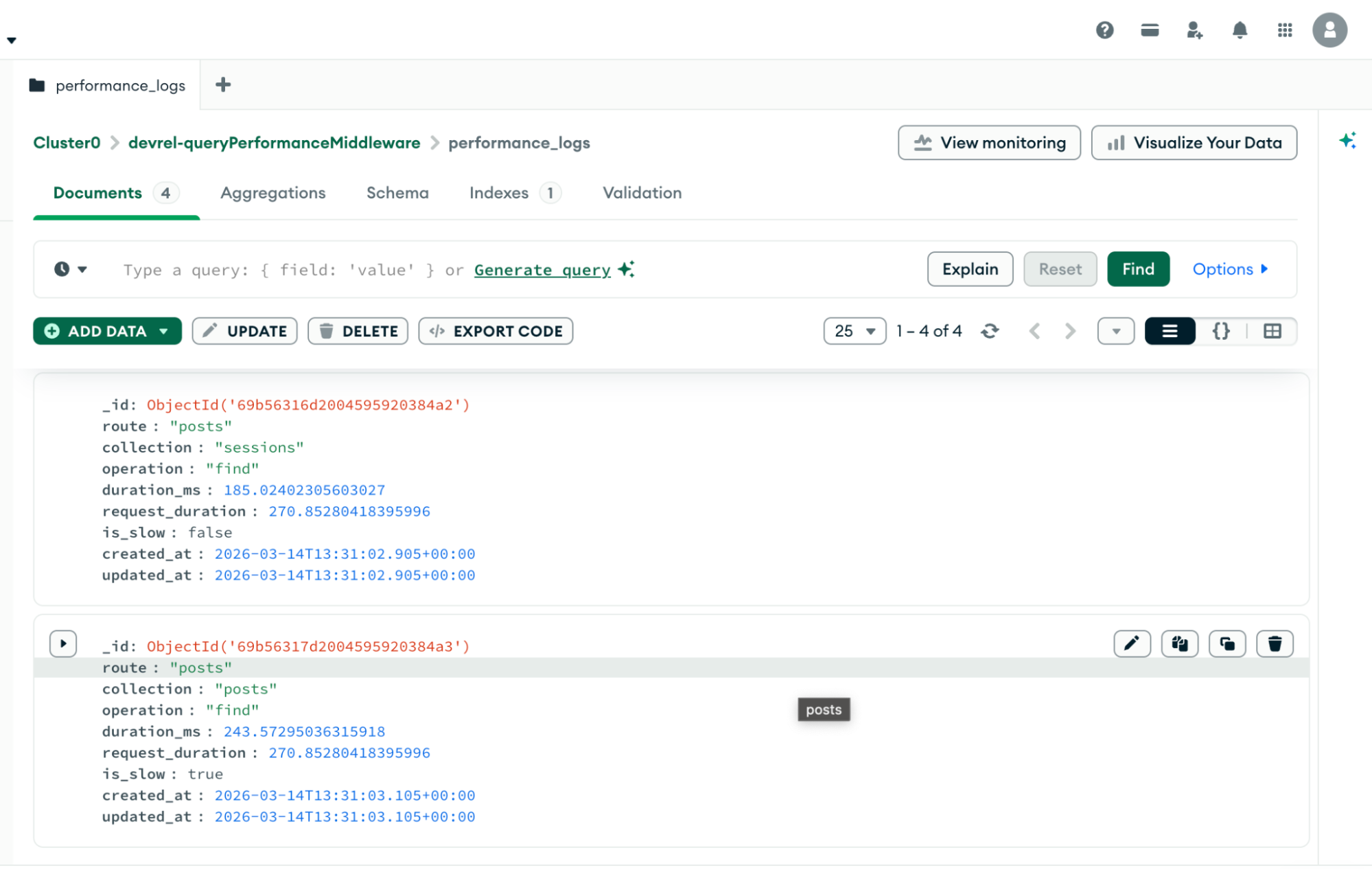
And our MongoDB performance_log collection should contain similar records
Automatically Cleaning Logs with TTL Indexes
Systems like this can generate a large number of log records. If these logs are never removed, the
performance_logs
collection will continue to grow and eventually consume unnecessary storage.
MongoDB provides a built-in feature called TTL (Time To Live) indexes that automatically delete documents after a specified time. This allows us to keep only recent monitoring data while old logs are removed automatically.
Since we are using MongoDB Atlas , we can create the TTL index directly from the Atlas dashboard following the simple steps below:
- Open your MongoDB Atlas dashboard
- Navigate to your cluster and click Browse Collections
- Select the
performance_logs收藏 - 打开 索引 tab and click Create Index
Configure the index with the following values:
Field: created_atType: Ascending (1)TTL: 604800 secondsIf you're not using MongoDB Atlas, you can create the TTL index directly from the MongoDB shell using the command below:
db.performance_logs.createIndex( { created_at:
1

},
{ expireAfterSeconds:
604800

}
)
This achieves the same result by automatically deleting logs after seven days.
604800
seconds is equal to
7天
. Once the index is created, MongoDB will automatically delete any performance log older than seven days.
Why This Approach Works Well
This architecture keeps monitoring concerns separate from application logic.
The middleware measures request performance while the MongoDB command subscriber captures database-level metrics. Because the subscriber hooks into the driver itself, it automatically detects queries without modifying application code.
The result is a simple but effective monitoring system that can help identify slow queries, diagnose performance bottlenecks, and improve application efficiency.
结论
Database performance issues are often difficult to diagnose without visibility into query execution. By combining Laravel middleware with MongoDB driver monitoring, we can build a lightweight system that tracks both request duration and query performance.
Once you understand how to capture database events at the driver level, it becomes much easier to build tools that detect slow queries, surface performance insights, and improve the reliability of your applications.
You can find the full source code on GitHub 。
As a bonus, I built a Laravel package for the implementation in this article . Feel free to install and use it in your already existing Laravel and MongoDB projects.