跑步
php artisan dev
starts four processes in one terminal UI: the development server, a queue worker, Pail, and Vite. Until Laravel 13.25 they all wrote to the same stream, which is fine until Vite rebuilds while a queue worker is logging and you are trying to read a stack trace from Pail.
这
artisan dev
命令
shelled out to
concurrently
, and Laravel 13.25 replaces it with
@laravel/multiplex
, a terminal UI that keeps each process separate. Nothing to install and nothing to configure,
php artisan dev
picks it up:
php

工匠

开发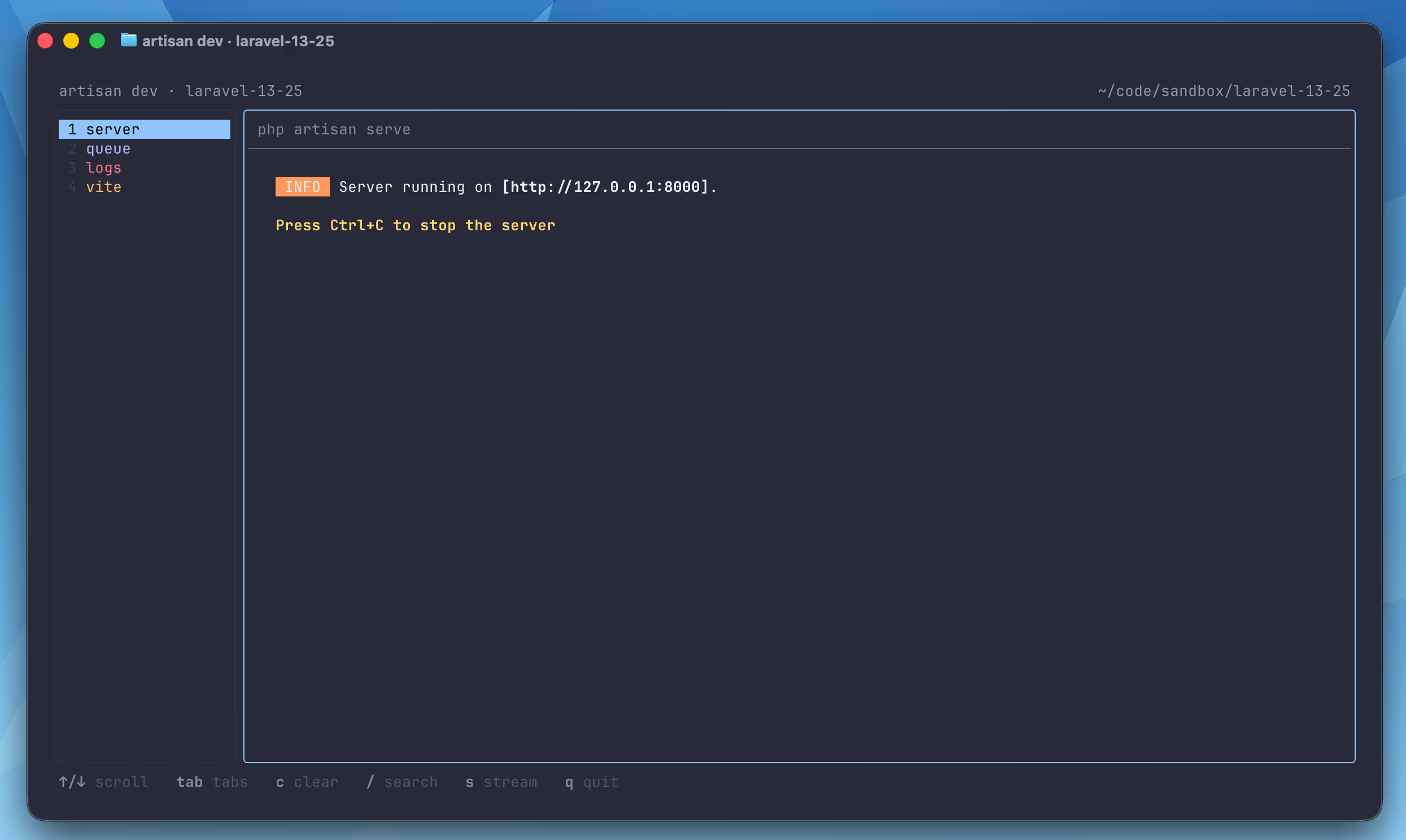
The Three Modes
标签 is the default. Each registered process gets its own tab, and you switch between them to read one process at a time. Individual processes can be restarted or have their logs cleared without touching the others, and a process that crashes restarts on its own.
溪流 is the old behavior with better tooling: one interleaved feed, but scrollable and searchable rather than whatever your terminal's scrollback happens to hold.
排队
is plain output with no UI at all. It is selected automatically when there is no TTY, which is what you want when
artisan dev
runs under a process supervisor, in a container, or in CI.
Pick one for a single run:
php

工匠

开发

--tabsphp

工匠

开发

--streamphp

工匠

开发

--inline
The short forms are
-t
,
-s
, 和
-i
. You can also toggle between tabs and stream while the UI is running, so a flag is only needed when you want to start somewhere other than the default.
Search works in both tabs and stream mode, and timestamps can be turned on in any mode:
php

工匠

开发

--timestamps
When the command exits, everything that was buffered is printed to the main terminal stream-style. Quitting the UI does not throw away the output you were looking at.
Setting the Default for a Project
The per-run flags are for one-offs. If everyone on the project should get stream mode, or if you want timestamps every time, set it in the
boot
method of a service provider next to your process registrations:
命名空间

应用程序\提供商
;使用

Illuminate\Foundation\DevCommands
;使用

Illuminate\支持\服务提供商
;班级

应用服务提供商

延伸

服务提供者{
民众

功能

引导
()
:

空白{
如果
(
!

$this
->
应用程序
->
环境
(
'当地的'
)){
返回
;}
开发命令
::
溪流
();
开发命令
::
带有时间戳
();}}
Seven methods configure the command:
| 方法 | What it does |
|---|---|
DevCommands::tabs() |
One tab per process (the default) |
DevCommands::stream() |
One interleaved, scrollable feed |
DevCommands::inline() |
Plain output, no UI |
DevCommands::withTimestamps() |
Prefix every line with a timestamp |
DevCommands::disableAutoRestart() |
Leave a crashed process dead instead of restarting it |
DevCommands::bufferSize(5000) |
Lines kept per process in tabs mode |
DevCommands::streamBufferSize(10000) |
Lines kept in total in stream mode |
Command-line flags win over the provider, so
php artisan dev --tabs
overrides a
DevCommands::stream()
call and
--no-restart
overrides the auto-restart default for that run.
The buffer sizes are the two worth thinking about. Each process keeps its own ring buffer in tabs mode, so a chatty Vite process cannot push a queue worker's output out of view the way it does in a shared scrollback. Raise
bufferSize()
if you find yourself scrolling past the top of a tab.
Auto Restart
A crashed process restarts automatically. This is a real change in behavior from the
--kill-others-on-fail
那
artisan dev
passed to
concurrently
since 13.18, where one process dying took the whole stack down with it.
The new default suits the common case, a queue worker that dies on a fatal error while you are editing a job class, or Vite falling over on a bad import. You fix the file and the process comes back without you restarting the whole stack. When you would rather see the failure and stop, turn it off:
php

工匠

开发

--no-restart
Or permanently, with
DevCommands::disableAutoRestart()
。
What Runs Where
The multiplex path is macOS and Linux only for now. Windows keeps running through
concurrently
, and the mode and buffer methods are no-ops there, though
--timestamps
和
--no-restart
are both translated to the equivalent
concurrently
flags so those two work on every platform.
The other requirement is Node v22.13 or later, which is the floor for
@laravel/multiplex
. The framework pins the package to a specific minor version and runs it through your project's package manager exec command, so a pnpm project runs
pnpm dlx
and an npm project runs
npx
without any configuration. There is no dependency to add to
package.json
。
One more flag, mostly for tooling rather than for reading:
php

工匠

开发

--json
That emits newline-delimited JSON events instead of formatted output, and implies
--inline
. It is the hook for wrapping
artisan dev
in something else, an editor extension or a dashboard that wants structured process output.
这
SERVER_HOST
使固定
A related change landed in the same release. The default
server
process was registered as
serve --host=localhost
, and because an explicit command-line option beats
ServeCommand
's environment-based default,
SERVER_HOST
was ignored once the application skeleton switched from the old
composer dev
script to
artisan dev
. Exposing the development server to another device on your network stopped working.
The default is now plain
serve
, so this behaves as it did before:
SERVER_HOST
=
0.0.0.0
php artisan dev
If you registered your own
server
process to work around this, you can delete it.
进一步阅读
- Laravel artisan dev:运行服务器、队列、日志和 Vite
covers registering your own processes with
DevCommands - Laravel 13.16.0 中的 artisan dev 命令 is where the command was introduced
- Laravel 13.25 中暂停所有队列并引入新的 Artisan 开发 UI 包含完整的发行说明
- The multiplex integration was contributed by
乔·坦南鲍姆
在
#61100
,以及
servedefault fix by @n3crosis 在 #61090