
此包提供了一种非常简单的方法,可以将“日历”视图添加到您的 Backpack CRUD 中。节省大量集成时间 全日历 ,并受益于 Backpack 核心团队的经验和最佳实践。以下是主要功能:
日历视图
- 通过切换到“日历”视图,可以轻松访问 CRUD 条目的日历表示。
导航
- 选择日期或日期范围时添加日历事件。
- 单击后,可以访问预览、编辑、删除等事件选项。
- 轻松向事件菜单添加更多选项,以允许用户执行用户驱动的操作。
一体化
- 与现有的 Backpack CRUD 无缝集成,无需进行重大代码更改即可添加日历功能。
您不需要更改您的 crud 字段名称,您可以简单地将它们映射到日历字段。
演示
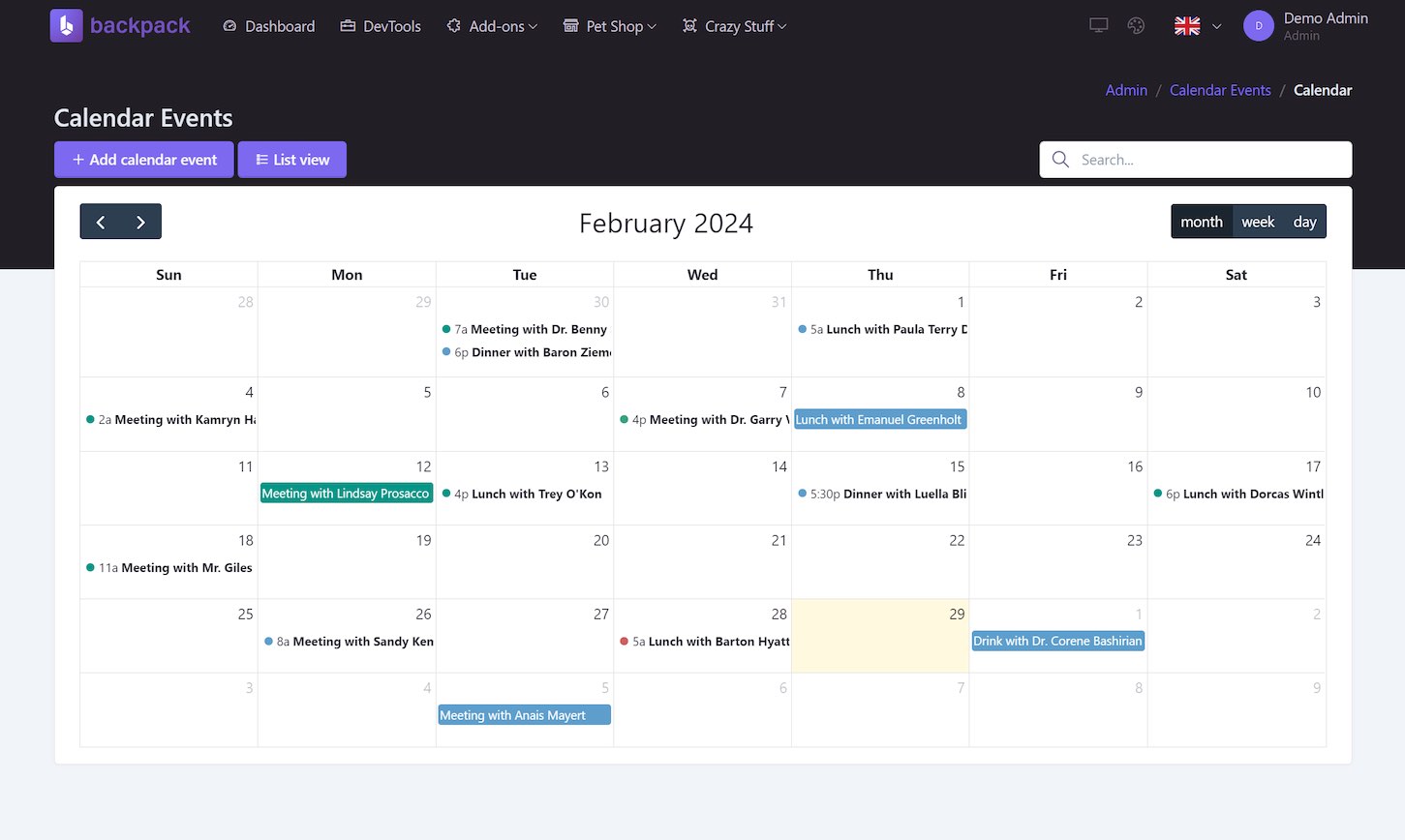
Online demo: https://demo.backpackforlaravel.com/
安装
- 通过 Composer 安装软件包
composer require backpack/calendar-operation
- 将操作添加到您的
EntityCrudController,通过添加CalendarOperation你的特质EntityCrudController。这还会将日历按钮切换添加到列表视图中:
class EntityCrudController extends CrudController
{
    ...
    use \Backpack\CRUD\app\Http\Controllers\Operations\ListOperation;
+   use \Backpack\CalendarOperation\CalendarOperation;
- 配置您的日历操作。 这些是日历操作的默认设置,仅当您想要更改它们时才使用。
public function setupCalendarOperation()
{
    // Set the initial view
    CRUD::setOperationSetting('initial-view', 'dayGridMonth');

    // Set the available views
    CRUD::setOperationSetting('views', ['dayGridMonth', 'timeGridWeek', 'timeGridDay']);

    // Are the calendar events editable?
    CRUD::setOperationSetting('editable', true);

    // Set the calendar default colors
    CRUD::setOperationSetting('background_color', '#3788d8');
    CRUD::setOperationSetting('text_color', '#ffffff');

    // CalendarOperation will inject a javascript into your create and
    // update views to handle the date fields as we do on our demo.
    CRUD::setOperationSetting('with-javascript-widget', true);
}
日历操作使用字段
title
,
start
,
end
,
background_color
, 和
text_color
显示日历上的事件。
您不需要遵循此命名约定,您可以将您的字段映射到日历字段。
以下是使用不同名称时如何将字段映射到日历字段的示例:
// in the EntityCrudController ...
protected function getCalendarFieldsMap(): array
{
    // Map your fields to the calendar fields.
    return [
        'title' => 'title',
        'start' => 'start',
        'end' => 'end',
        'background_color' => 'background_color',
        'text_color' => 'text_color',
        'all_day' => 'all_day',
    ];

    // you only need to map the fields that you use and are different:
    return [
        'title' => 'event_name',
        'start' => 'start_date',
    ];
}
如果您只是为新的 CRUD 创建迁移,我们建议您使用以下设置以避免映射字段:
Schema::create('calendar', function (Blueprint $table) {
    $table->id();
    $table->string('title');
    $table->dateTime('start');
    $table->dateTime('end')->nullable(); // optional
    $table->string('background_color')->nullable(); // optional
    $table->string('text_color')->nullable(); // optional
    // ...
    $table->timestamps();
});
定制
编辑日历 javascript 选项
Backpack 为日历设置了一些“自以为是”的默认值,但你可以通过调用来更改它们
setOperationSetting('javascript-configuration')
在
setupCalendarOperation()
。
public function setupCalendarOperation()
{
    CRUD::setOperationSetting('javascript-configuration', [
        // ... FullCalendar options
        // https://fullcalendar.io/docs
        'dayMaxEvents' => false, // by default backpack uses 5
    ]);
}
在日历事件菜单中添加/删除菜单项
背包附带 3 个默认按钮,存储在
calendar.line-buttons
设置。这些是默认按钮:
- 预览 - 将用户重定向到活动展示页面
- 编辑 - 将用户重定向到事件编辑页面
- 删除 - 调用删除事件端点
这些操作的访问方式与 CRUD 操作相同,因此您可以使用相同的
access
属性来控制按钮的可见性。
public function setupCalendarOperation()
{
    // if user is not admin, don't show any of the event buttons
    if(!backpack_user()->hasRole('admin'))
    {
        CRUD::denyAccess(['delete', 'update', 'show'])
    }

    // to remove the default buttons, you can just clear the setting array:
    CRUD::setOperationSetting('line-buttons', []);

    // ... now add your custom buttons
}
如果要将自定义菜单项添加到日历事件菜单,可以通过调用
addCalendarLineButton()
在
setupCalendarOperation()
。
$this->addCalendarLineButton(
    action: 'email',
    label: 'Send Email',
    group: 'send'
    url: fn($event) => backpack_url('send-email', ['email' => $event->email]), // $event is the model instance
);
如您所见,您可以添加
url
按钮,它将被用作
href
按钮的属性。使用闭包,我们可以确保你有
$event
可用于构建 URL 的实例。
access
按钮中的属性也支持闭包:
access: fn($event) => backpack_user()->hasRole('admin'), // only show button for admins
配置事件颜色
除了直接将事件颜色保存在数据库中之外,还可以使用闭包根据事件属性确定颜色。
public function setupCalendarOperation()
{
CRUD::setOperationSetting('background_color', fn($event) => $event->active ? 'green' : 'red');

// same principle applies to text color
CRUD::setOperationSetting('text_color', fn($event) => $event->active ? 'white' : 'black');
}
使用 Javascript 处理菜单项
每次单击菜单项时,
menuClick
事件将以 JavaScript 形式发送,
action
和
properties
按钮。您可以监听此事件并对其执行任何操作。
$this->addCalendarLineButton(
    action: 'alert',
    label: 'Javascript Event',
    group: 'alert',
    properties: [
        'message' => 'Alert message!',
    ],
);
document.getElementById('calendar').addEventListener('menuClick', e => {
  let { action, event, properties } = e.detail;
  if (action === "alert") alert(`Event ${event.id} — ${properties.message}`);
});
这将触发一条警报消息
"Event 1 — Alert message!"
。
变更日志
请参阅 变更日志文件 。
支持
这是第一方 Backpack 插件。如果您遇到任何问题,请在我们的 社区论坛 。
贡献
这是一个闭源软件包。如需报告错误、功能请求和改进建议,请在我们的 社区论坛 。
安全
如果您发现任何与安全相关的问题,请发送电子邮件 [电子邮件保护] 而不是使用问题跟踪器。
致谢
执照
该项目是根据 EULA 发布的,因此您可以将其安装在任何 Backpack 和 Laravel 项目之上。请参阅 许可证文件 了解更多信息。
包裹访问
您目前无权访问此套餐。要获取访问权限,请继续购买。您将获得:
未来 12 个月
- 使用 Composer 下载或安装;
- 所有更新 (主要更新、次要更新和补丁);
12个月后
- 仍然可以访问您付费的所有版本和更新;
- 仍然可以使用 Composer 安装;
- 没有新版本或更新;